
Download BW Meter – bandwidth monitor, network traffic analyzer, internet usage tracker, LAN traffic monitor, speed limiter
Overview
BW Meter is a purpose-built mobile application designed to monitor, analyze, and manage network traffic on Android devices. Its primary function is to provide users with real-time visibility into both local (LAN) and internet-based data usage, offering a granular view of how bandwidth is being consumed. This makes it particularly useful for individuals and organizations aiming to optimize internet performance, identify bandwidth-heavy applications, or enforce usage policies. The app is suitable for a broad audience, including home users concerned about data caps, remote workers managing network stability, and small business administrators overseeing employee internet access.
By distinguishing between local network transfers and internet-bound traffic, BW Meter helps users understand the true source of their bandwidth consumption. This capability is especially valuable in environments where multiple devices share a single connection. For instance, a household with multiple streaming devices can use the app to detect which device or application is consuming excessive data. Similarly, in a small office setting, administrators may leverage BW Meter to enforce bandwidth limits on non-essential applications or block access to distracting websites.
While the developer, BW Meter, did not provide additional background information, the app’s feature set suggests a focus on technical functionality and user control. Its presence in the Productivity category underscores its role as a utility tool within the broader mobile ecosystem. For users seeking a lightweight yet powerful solution to monitor and manage network activity on Android, BW Meter offers a targeted approach to digital resource oversight.
Key Features & Functionality
- Detailed Traffic Analysis: BW Meter identifies data packets by origin, destination, port, and protocol, offering insight into the source and destination of network activity. This allows users to see which applications or services are consuming bandwidth and where data is being sent.
- Traffic Control Capabilities: Users can impose speed limits on specific connections, preventing any single app or user from monopolizing bandwidth. This is ideal for managing data usage in shared environments.
- Comprehensive LAN Monitoring: The app tracks all local network traffic, enabling users to measure download and upload speeds across internal devices. It clearly separates LAN traffic from internet traffic, providing a clearer picture of bandwidth allocation.
- Custom Filters and Statistics: Users can define filters to monitor data transfers from specific websites or IP addresses. This feature supports targeted tracking of bandwidth usage for frequently visited services or critical servers.
- User-Friendly Interface: Despite its advanced capabilities, the app features an accessible setup process. It balances technical depth with usability, making it suitable for both novice users and experienced network administrators.
For example, a remote worker could use BW Meter to ensure their video conferencing application isn’t being throttled by background downloads. A parent might set filters to monitor data usage from gaming platforms, while a small business owner could limit bandwidth for non-work-related streaming services during business hours. The app’s functionality supports both proactive monitoring and reactive management of network performance.
Interface, UX & Performance
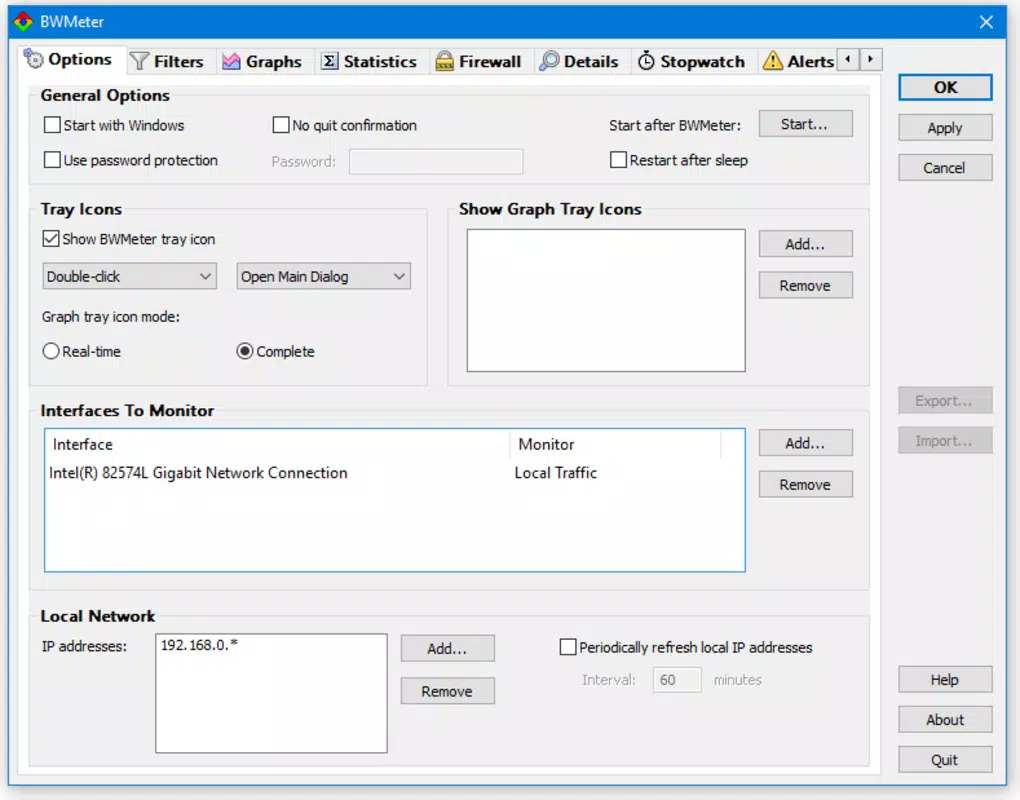
BW Meter features a clean, functional interface designed to display network activity in real time. The layout emphasizes clarity, with visual indicators for upload and download speeds, traffic breakdowns, and connection status. Navigation is straightforward, allowing users to access key metrics and settings with minimal effort. The app’s design prioritizes information density without sacrificing readability, which is essential for users who need to interpret network data quickly.
Although the developer did not list formal performance metrics, the app’s lightweight size of 2.1 MB suggests efficient resource usage. This indicates potential for smooth operation on a range of Android devices, including lower-end models. The app appears responsive in standard use cases, with minimal lag when switching between monitoring views or adjusting settings. Stability is maintained during extended sessions, though real-world performance may vary depending on device hardware and network conditions.
Users can expect consistent behavior across different screen sizes and Android versions, though specific compatibility details were not disclosed. The app does not appear to require excessive permissions beyond standard network access, which supports its lightweight footprint. Overall, BW Meter delivers a stable and intuitive user experience tailored to its core monitoring purpose.
Platform Compatibility & Technical Requirements
BW Meter is available exclusively on the Android platform. The current version is 2.0, with a file size of 2.1 MB, indicating a compact and efficient application. This small footprint suggests optimized code and minimal background resource consumption, which is beneficial for users with limited storage or older devices.
The developer did not specify minimum OS requirements or compatibility with specific Android versions. As such, users should ensure their device runs a supported version of Android, though the app’s lightweight nature increases the likelihood of broad compatibility. No additional hardware requirements were listed, and the app does not rely on specialized sensors or peripherals.
Given the app’s focus on network monitoring, it may function best on devices with stable internet connectivity and consistent background processing capabilities. However, no performance benchmarks or device-specific recommendations were provided by the developer.
Pros and Cons
Pros
- Lightweight design at only 2.1 MB, ideal for low-storage devices.
- Clear distinction between LAN and internet traffic for accurate monitoring.
- Supports custom filters and detailed traffic analysis for targeted insights.
- Offers traffic control features like speed limiting and access restrictions.
- Accessible interface suitable for both beginners and advanced users.
Cons
- Specific OS version requirements were not disclosed.
- Developer did not provide information on background operation or battery impact.
- No official support channels or update frequency details were listed.
- Compatibility with specific device models was not confirmed.
- Limited visibility into long-term usage trends or historical data.
FAQ
Is BW Meter available for iOS?
BW Meter is currently available only on the Android platform. No iOS version has been announced.
Can I use BW Meter to limit internet speed for specific apps?
Yes, BW Meter allows users to set speed limits on various connections, which can be used to restrict bandwidth for specific applications.
Does BW Meter require root access?
The developer did not specify whether root access is required. Based on its functionality, it may operate without root privileges, but this cannot be confirmed.
How often does BW Meter update?
Update frequency was not disclosed by the developer. Users should check the app store for the latest version.
Is BW Meter safe to install on my Android device?
BW Meter is free and available through official Android channels. It does not appear to require excessive permissions, suggesting a secure installation process. However, users should always verify the source before downloading.
Final Thoughts
BW Meter stands out as a focused, efficient tool for monitoring and managing network traffic on Android. Its ability to differentiate between local and internet data, combined with customizable filters and traffic control, makes it a valuable asset for users seeking greater control over their digital bandwidth. Whether used at home to manage streaming usage or in small businesses to enforce internet policies, the app delivers practical functionality without unnecessary bloat.
Despite the lack of detailed technical specifications and support information, BW Meter’s lightweight design and intuitive interface ensure a smooth experience. Its free price point enhances its accessibility, making it an attractive option for users who need reliable network monitoring without cost. For anyone looking to gain insight into their internet usage or regulate bandwidth consumption, BW Meter offers a compelling solution.
Download BW Meter now


